안녕하세요! 오늘은 angr CTF 문제를 풀어보면서 angr에 대한 사용법을 익혀보도록 하겠습니다.
26년이 되었는데 다들 새해 복 많이 받으시고 좋은 일만 가득하시기 바랍니다.
먼저 angr ctf문제는 아래 주소에서 확인해볼수 있습니다.
https://github.com/jakespringer/angr_ctf
GitHub - jakespringer/angr_ctf
Contribute to jakespringer/angr_ctf development by creating an account on GitHub.
github.com
git clone https://github.com/jakespringer/angr_ctf.git
git명령어로 문제 파일을 전체로 다운로드 받았습니다.
다음과 같이 총 17개의 문제들이 있습니다.
각 파일 안엔 다음과 같이 4개의 파일이 있는데, 00_angr.find.c.jinsa는 문제 원본 소스 코드입니다.
generate.py는 문제를 만들어 주는 파일입니다. generate.py를 실행하기 위해선 32비트 라이브러리 헤더 파일과 jinja2 라이브러리가 필요합니다.
apt install gcc-multilib
pip install jinja2
로 다운받아주고, 다음 명령어로 문제를 생성했습니다.
python generate.py 0 00_angr_find이제 scaffold00.py를 보면
import angr
import sys
def main ( argv ):
# Create an Angr project.
# If you want to be able to point to the binary from the command line, you can
# use argv[1] as the parameter. Then, you can run the script from the command
# line as follows:
# python ./scaffold00.py [binary]
# (!)
path_to_binary = ??? # :string
project = angr.Project(path_to_binary)
# Tell Angr where to start executing (should it start from the main()
# function or somewhere else?) For now, use the entry_state function
# to instruct Angr to start from the main() function.
initial_state = project.factory.entry_state(
add_options = { angr.options.SYMBOL_FILL_UNCONSTRAINED_MEMORY,
angr.options.SYMBOL_FILL_UNCONSTRAINED_REGISTERS}
)
# Create a simulation manager initialized with the starting state. It provides
# a number of useful tools to search and execute the binary.
simulation = project.factory.simgr(initial_state)
# Explore the binary to attempt to find the address that prints "Good Job."
# You will have to find the address you want to find and insert it here.
# This function will keep executing until it either finds a solution or it
# has explored every possible path through the executable.
# (!)
print_good_address = ??? # :integer (probably in hexadecimal)
simulation.explore( find = print_good_address)
# Check that we have found a solution. The simulation.explore() method will
# set simulation.found to a list of the states that it could find that reach
# the instruction we asked it to search for. Remember, in Python, if a list
# is empty, it will be evaluated as false, otherwise true.
if simulation.found:
# The explore method stops after it finds a single state that arrives at the
# target address.
solution_state = simulation.found[ 0 ]
# Print the string that Angr wrote to stdin to follow solution_state. This
# is our solution.
print (solution_state.posix.dumps(sys.stdin.fileno()).decode())
else :
# If Angr could not find a path that reaches print_good_address, throw an
# error. Perhaps you mistyped the print_good_address?
raise Exception ( 'Could not find the solution' )
if __name__ == '__main__' :
main(sys.argv)
위와 같이 주석들과 저희가 채워야 하는 값들을 ???로 표시해놨습니다.
저희는 라이브러리 사용법을 알아보면서 해당 값들을 채워보고, 문제를 풀어보겠습니다.
00_angr_find
먼저 문제 바이너리를 간단히 분석해보겠습니다.
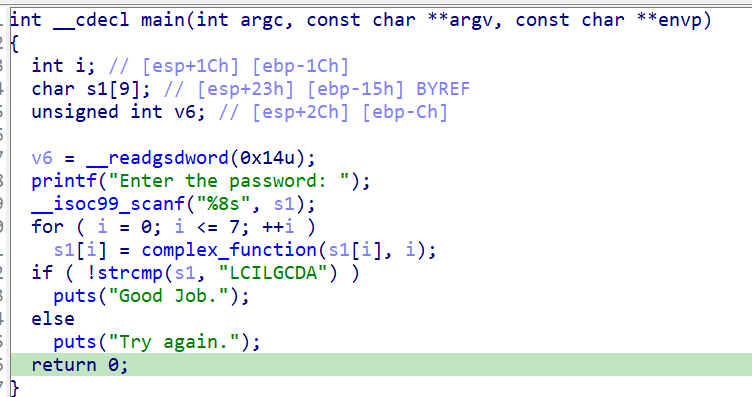
흔히 보이는 리버싱 기초 문제로 complex_function이라는 난독화 함수를 거쳐서 "LCILGCDA"라는 string이 나오는지 검사하는 로직입니다.
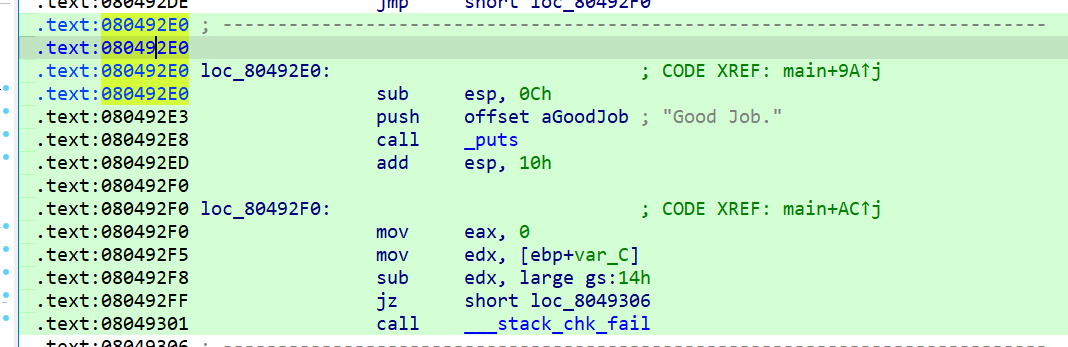
IDA나 odjdump와 같은 도구를 사용하여, good job이 출력되는 분기에서의 주소를 찾으면 됩니다.
080492E0이라는 주소에 Good job.이 출력되는걸 확인할 수 있습니다.
아까 위에 있던 scaffold00.py에서 ???가 되어있는 부분을 수정합니다.
path_to_binary = "./00_angr_find" # :string
path_to_binary에 문제 파일 이름을 적어주고,
print_good_address = 0x 80492E0 # :integer (probably in hexadecimal)
print_good_address에 주소값을 적어줍니다.
실행하면 다음과 같은 문자열을 획득하게 됩니다.
문제파일을 실행하고 LZCCUNLF라는 문자열을 넣어주겠습니다.
이러면 첫번째 문제는 간단하게 클리어했습니다.
01_angr_avoid
마찬가지로 문제파일을 생성해주고 IDA로 확인해보겠습니다.
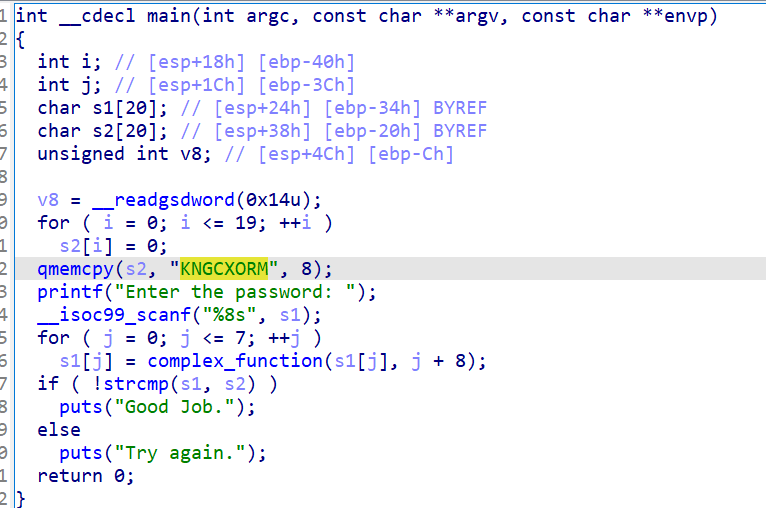
두번째 파일은 분석하는게 쉽지 않더라고요.
이건 일부로 분석을 안되게 막아놓은 것 같습니다.
IDA로 뜯어서 보려면 볼 순 있을 것 같은데 문제의 의도는 아닌 것 같으니 넘기겠습니다.
함수 목록을 보면
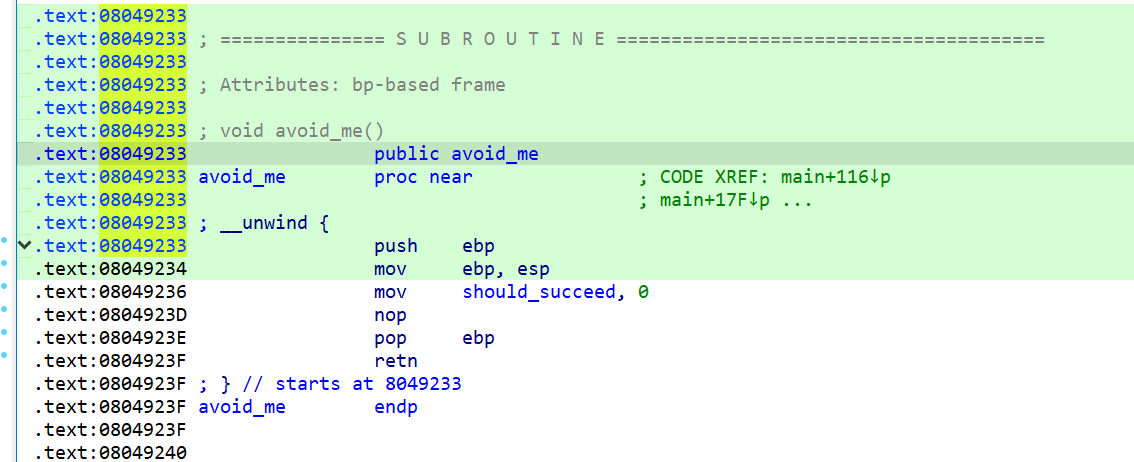
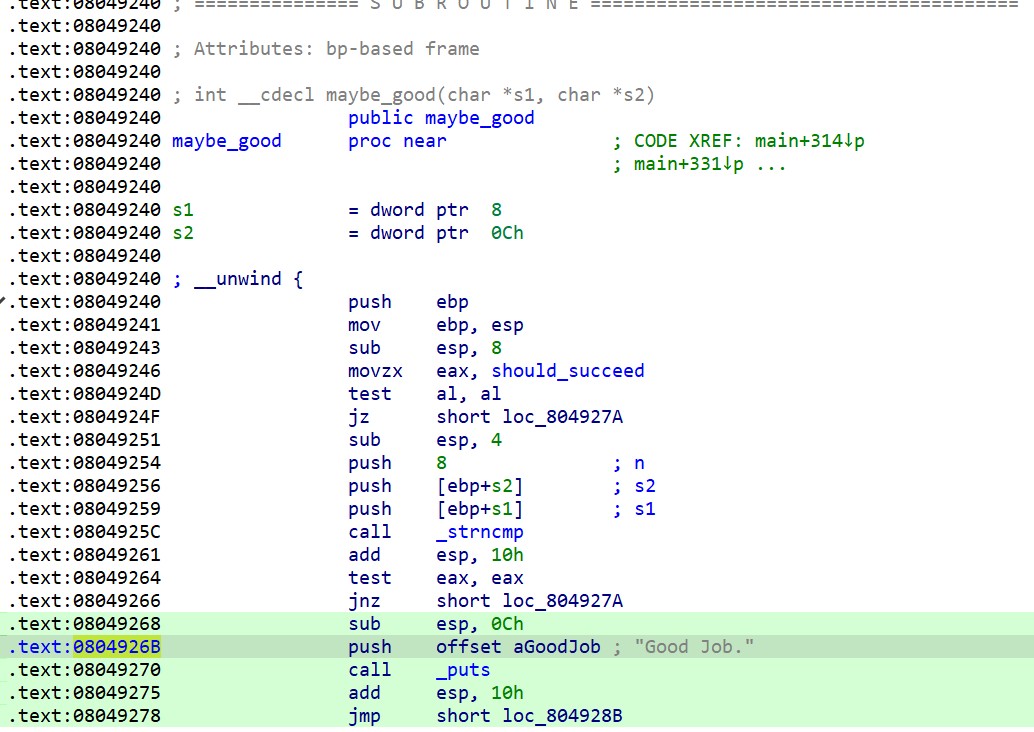
누가봐도 수상해보이는 함수가 있습니다. 문제의 의도는 해당 함수를 피하게 하는 것일테니 함수의 주소를 알아보겠습니다.
주소는 다음과 같습니다.
이제 python 파일을 열어서 빈칸을 채워보겠습니다.
def main ( argv ):
path_to_binary = "./01_angr_avoid"
project = angr.Project(path_to_binary)
initial_state = project.factory.entry_state(
add_options = { angr.options.SYMBOL_FILL_UNCONSTRAINED_MEMORY,
angr.options.SYMBOL_FILL_UNCONSTRAINED_REGISTERS}
)
simulation = project.factory.simgr(initial_state)
print_good_address = 0x804926B
will_not_succeed_address = 0x 8049233
로 채워줬습니다.
여기서 주의해줘야 할 점은 good_address를 채울때
함수의 Entry Point인 8049240으로 설정을 해두면, avoid_me를 통해 maybe_good으로 접근하더라도, should_succeed값을 통과하는 부분에서 걸려서 오답이 나오기 때문에 확실하게 Good Job이 출력되는 0804926B부분 주소로 설정해야 합니다.
\
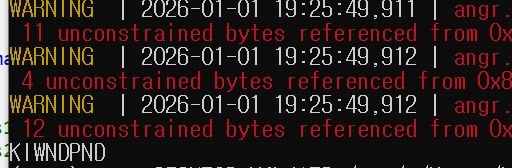
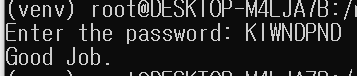
몇가지 오류와 함께 다음 문자열이 떴고 입력하니까 Good Job이 떴습니다.
02_angr_find_condition
이번 문제도 아까 0번 문제랑 매우 비슷한 형태입니다.
def is_successful ( state ):
# Dump whatever has been printed out by the binary so far into a string.
stdout_output = state.posix.dumps(sys.stdout.fileno())
# Return whether 'Good Job.' has been printed yet.
# (!)
return ??? # :boolean
# Same as above, but this time check if the state should abort. If you return
# False, Angr will continue to step the state. In this specific challenge, the
# only time at which you will know you should abort is when the program prints
# "Try again."
def should_abort ( state ):
stdout_output = state.posix.dumps(sys.stdout.fileno())
return ??? # :boolean
# Tell Angr to explore the binary and find any state that is_successful identfies
# as a successful state by returning True.
simulation.explore( find = is_successful, avoid = should_abort)
if simulation.found:
solution_state = simulation.found[ 0 ]
print (solution_state.posix.dumps(sys.stdin.fileno()).decode())
else :
raise Exception ( 'Could not find the solution' )
if __name__ == '__main__' :
main(sys.argv)
채워야 하는 코드는 is_successful과 should abort라는 코드네요.
이번에는 address로 찾는게 아니기 때문에 문자열을 직접 넣을 수 있습니다. 저번 포스팅 때 썼던 방법이네요.
def is_successful ( state ):
stdout_output = state.posix.dumps(sys.stdout.fileno())
return b "Good Job." in stdout_output # :boolean
def should_abort ( state ):
stdout_output = state.posix.dumps(sys.stdout.fileno())
return b "Try again." in stdout_output # :boolean
다음과 같이 작성해줬습니다.
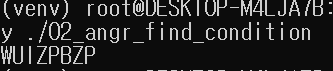
이제 문제 실행 결과입니다.
비교적 쉬운 문제이네요
return b " " in stdout_output은 stdout_output에 들어간 문자열이 "" 일때 True를 반환하는 문법입니다.
03_angr_symbolic_registers
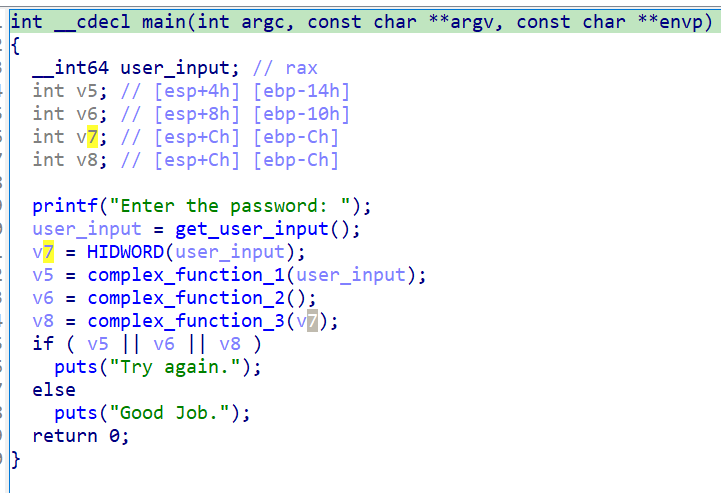
이번에도 complex_function을 통해 사용자 입력을 변환하는걸 역연산 하는 문제입니다.
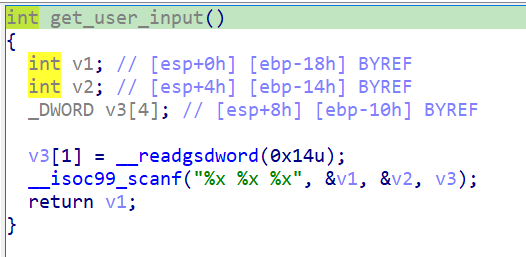
문제가 특이한 점은
get_user_input이라는 함수에서 사용자 입력을 3개나 받는다는 점입니다.
import angr
import claripy
import sys
def main ( argv ):
path_to_binary = argv[ 1 ]
project = angr.Project(path_to_binary)
start_address = ??? # :integer (probably hexadecimal)
initial_state = project.factory.blank_state(
addr = start_address,
add_options = { angr.options.SYMBOL_FILL_UNCONSTRAINED_MEMORY,
angr.options.SYMBOL_FILL_UNCONSTRAINED_REGISTERS}
)
password0_size_in_bits = ??? # :integer
password0 = claripy.BVS( 'password0' , password0_size_in_bits)
...
initial_state.regs. ??? = password0
...
simulation = project.factory.simgr(initial_state)
def is_successful ( state ):
stdout_output = state.posix.dumps(sys.stdout.fileno())
return ???
def should_abort ( state ):
stdout_output = state.posix.dumps(sys.stdout.fileno())
return ???
simulation.explore( find = is_successful, avoid = should_abort)
if simulation.found:
solution_state = simulation.found[ 0 ]
solution0 = solution_state.solver.eval(password0)
...
solution = ??? # :string
print (solution)
else :
raise Exception ( 'Could not find the solution' )
if __name__ == '__main__' :
main(sys.argv)
주석에 달려있는 내용을 보면
# Angr은 현재 scanf로 여러 가지를 읽는 것을 지원하지 않습니다 (예: # scanf("%u %u")를 시작하려면 시뮬레이션 엔진에 지시해야 합니다 # scanf 이후의 프로그램을 호출하고 기호를 수동으로 레지스터에 삽입합니다.
# 때때로 프로그램을 시작할 위치를 지정하고 싶을 때가 있습니다. 변수는 # start_address는 심볼릭 실행 엔진의 시작 위치를 지정합니다. # 우리는 entry_state가 아닌 blank_state를 사용하고 있다는 점에 유의하세요.
# 기호 값을 구합니다. 여러 해가 있는 경우에만 우리는 # 하나에 관심이 있으므로 eval을 사용하면 어떤 것이든 (하나만 제외하고) 반환할 수 있습니다 # 해결책. 해결하고자 하는 비트벡터를 평가합니다.
# 위에서 계산한 솔루션을 집계하고 형식화한 다음 인쇄합니다 # 전체 문자열. 정수의 순서에 주의하세요 # 예상 밑변(decimal, 팔진수, 16진수 등). 솔루션 = ? ? # :string
라고 되어있는데 이전문제와의 가장 핵심적인 차이를 넣어보면, 이전 문제들은 Standard input으로 사용자 입력을 받았다면, 이번 문제는 Symbolic Registers이므로, 레지스터에서 가져오는 값을 찾아야 합니다.
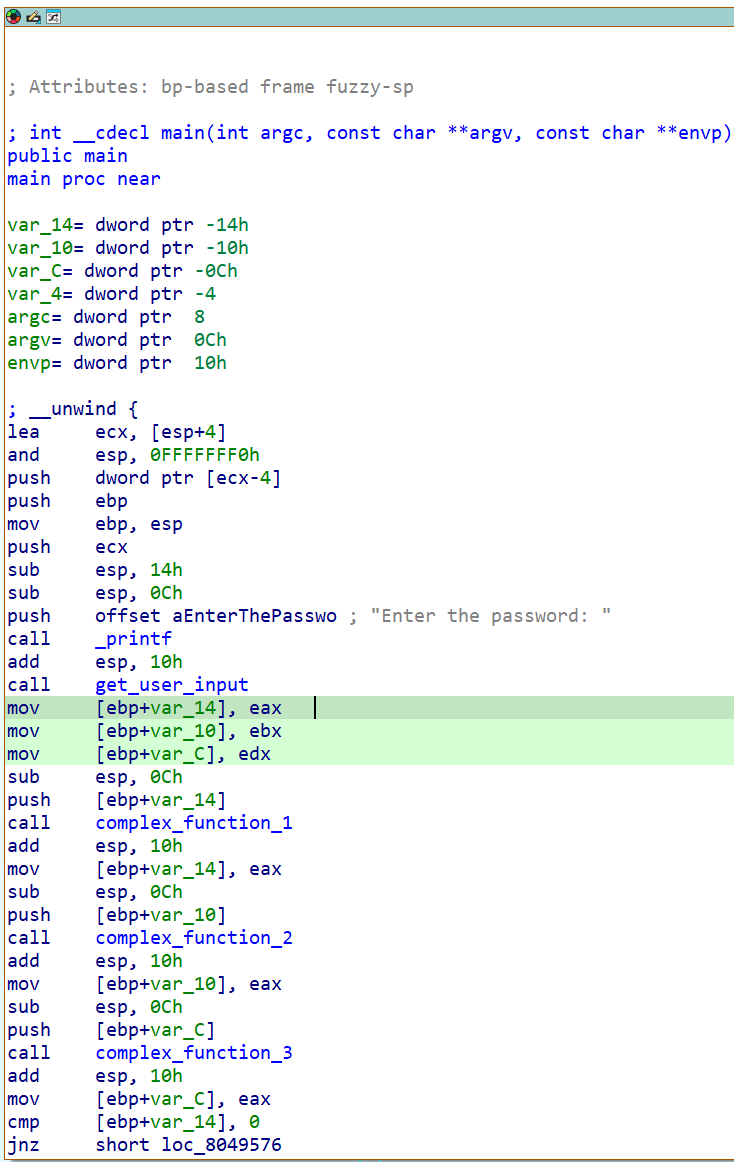
메인에서의 어셈블리 코드를 보면
get_user_input에서 레지스터값을 eax, ebx, edx에 저장해서 함수를 거치고 있습니다.
먼저 이번 문제에서 달라진게 있는데
initial_state = project.factory.blank_state(
입니다.
여태까지 initial_state는 항상 main의 Entry point였는데, 이번 문제는 blank_state로 설정되어있기 때문에, 스택이나, 라이브러리를 하나도 연결이 안되어있습니다. 저희는 레지스터에 들어가는 값들을 덮어써야 하기 때문에 blank state로 설정하고, 레지스터값들을 저희가 설정하면서 값들을 알아내야 합니다.
또한 레지스터값들을 설정하기 위해서, get_user_input 이후에 start_address를 설정해야합니다.
start_address = 0x 804952E # :integer (probably hexadecimal)
initial_state = project.factory.blank_state(
addr = start_address,
add_options = { angr.options.SYMBOL_FILL_UNCONSTRAINED_MEMORY,
angr.options.SYMBOL_FILL_UNCONSTRAINED_REGISTERS}
)
이렇게 설정을 해줬습니다. IDA로 봤을 때
해당 부분입니다. 그 다음은
password0_size_in_bits = ??? # :integer
password0 = claripy.BVS( 'password0' , password0_size_in_bits)
...
입니다. 이건 레지스터의 비트를 구분하기 위한 함수입니다. 저희가 풀고있는 문제는 32비트이므로 32값을 넣어주겠습니다.
또한 저희가 풀고있는 문제에서 알아내야 하는 레지스터 값은 eax, ebx, edx로 총 3개입니다. 따라서 인자를 3개 만들어줍니다.
password0_size_in_bits = 32 # :integer
password0 = claripy.BVS( 'password0' , password0_size_in_bits)
password1_size_in_bits = 32 # :integer
password1 = claripy.BVS( 'password1' , password1_size_in_bits)
password2_size_in_bits = 32 # :integer
password2 = claripy.BVS( 'password2' , password2_size_in_bits)
이렇게 설정하면 됩니다.
initial_state.regs. ??? = password0
...
simulation = project.factory.simgr(initial_state)
다음은 레지스터의 초기 상태를 설정해두는 코드입니다
마찬가지로 eax, ebx, edx로 3가지 넣어주면 됩니다.
성공,실패 조건은 쉬우니 바로 채우겠습니다.
def is_successful ( state ):
stdout_output = state.posix.dumps(sys.stdout.fileno())
return b "Good Job." in stdout_output
def should_abort ( state ):
stdout_output = state.posix.dumps(sys.stdout.fileno())
return b "Try again." in etr_sstdout_output
마지막 부분입니다.
if simulation.found:
solution_state = simulation.found[ 0
solution0 = solution_state.solver.eval(password0)
...
solution = ??? # :string
print (solution)
else :
raise Exception ( 'Could not find the solution' )
여기선 찾은 정답을 출력하는 부분입니다.
if simulation.found:
solution_state = simulation.found[ 0 ]
solution0 = solution_state.solver.eval(password0)
solution1 = solution_state.solver.eval(password1)
solution2 = solution_state.solver.eval(password2)
# Aggregate and format the solutions you computed above, and then print
# the full string. Pay attention to the order of the integers, and the
# expected base (decimal, octal, hexadecimal, etc).
solution = f{solution0}, {solution1}, {solution2} # :string
print (solution)
soulution_state을 만족하는 숫자를 찾습니다.
돌려봤는데 안되길래 start_address를 수정해줬습니다. get_user_input에서 복귀하자마자 바로 넣으니까 되네요
성공적으로 통과했습니다. 3단계부터 갑자기 살짝 어려워진듯한 느낌이 있었는데, 정말 유용하다는 느낌이 들긴 하네요.
일단 글이 좀 길어진 것 같아 여기까지 작성하고 나머지 문제는 다음 포스팅에서 풀어보겠습니다.
읽어주셔서 감사합니다~